速通TypeScript装饰器
原创 已于 2025-07-14 09:34:34 修改 · 粉丝可见 · 876 阅读 · 11 · 22 GEO检测 · 编辑https://blog.csdn.net/hacker_51/article/details/149312387
目录
[TOC]
一、简介
装饰器本质是一种特殊的 函数 它可以对:类、属性、方法、参数进行扩展,同时能让代码更简介。
装饰器自 2015 年在ECMAScript-6 中被提出到现在,已将近10年。
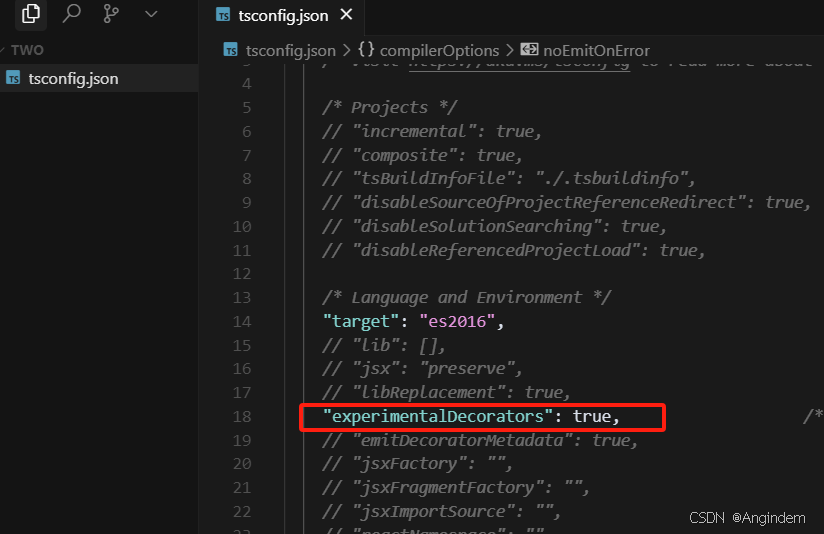
截止目前,装饰器依然是实验性特性,需要开发者手动调整配置,来开启装饰器支持。
装饰器有5种:
类装饰器
属性装饰器
方法装饰器
访问器装饰器
参数装饰器
备注:虽然 Typescript5.0 中可以直接使用 类装饰器 ,但为了确保其他装饰器可用,现阶段使用时仍建议使用 experimentalDecorators 配置来开启装饰器支持,而且不排除在未来的版本中,官方会 进一步调整 Announcing TypeScript 5.0 RC - TypeScript
二、类装饰器 1、基础语法 类装饰器是一个应用在类声明上的函数,可以为类添加额外的功能,或添加额外的逻辑。
第一步 :开启支持装饰器
第二步 :入门基础语法
1 2 3 4 5 6 7 8 9 10 11 12 13 14 15 16 17 18 19 function Demo (target : Function console .log (target);@Demo class Person {constructor (public name :string , public age :number greet (console .log (`Hi, I am ${this .name} ` )
2、应用举例 需求:定义一个装饰器,实现 Person 实例调用 tostring 时返回 JS0N.stringify 的执行结果。
1
2
3
4
5
6
7
8
9
10
11
12
13
14
15
16
17
18
19
20
21
22
23
24
25
26
27
28
function CustomString (target : Function prototype toString = function (return JSON .stringify (this )Object .seal (target.prototype @CustomString class Person {constructor (public name :string , public age :number greet (console .log (`Hi, I am ${this .name} ` )const p1 = new Person ('Angindem' , 30 )console .log (p1.toString ());interface Person {x :number Person .prototype x = 99
3、关于返回值
类装饰器 有 替换 掉被装饰的类。无 返回值:若类装饰器无返回值或返回 undefined ,那被装饰的类 不会
1
2
3
4
5
6
7
8
9
10
11
12
13
14
15
16
17
18
function Demo (target :Function return class {test (console .log ('200' );console .log ('300' );console .log ('400' );@Demo class Person {test (console .log ('test' );console .log (Person );
4、关于构造类型 在TypeScript中, Function 类型所表示的范围十分广泛,包括:普通函数、箭头函数、方法等等但并非 Function 类型的函数都可以被 new 关键字实例化,例如箭头函数是不能被实例化的,那么TypeScript 中概如何声明一个构造类型呢?有以下两种方式:
仅声明构造类型
1 2 3 4 5 6 7 8 9 10 11 12 13 14 15 16 17 18 type Constructor = new (...args : any []) => {};function test (fn : Function const Person = (test (Person )
声明构造类型+指定静态属性
1 2 3 4 5 6 7 8 9 10 11 12 13 14 15 16 17 18 19 20 21 22 type Constructor = {new (...args : any []): {};wife : string ;function test (fn : Constructor class Person {static wife :string test (Person )
5、替换被装饰的类 对于高级一些的装饰器,不仅仅是覆盖一个原型上的方法,还要有更多功能,例如添加新的方法和状态。
需求:设计一个 LogTime 装饰器,可以给实例添加一个属性,用于记录实例对象的创建时间,再添加一个方法用于读取创建时间。
1 2 3 4 5 6 7 8 9 10 11 12 13 14 15 16 17 18 19 20 21 22 23 24 25 26 27 28 29 30 31 32 33 type Constructor = new (...args : any []) => {}interface Person {getTime ():void function LogTime <T extends Constructor >(target :T) {return class extends target{createdTime : Date constructor (...args : any [] ) {super (...args)this .createdTime = new Date ()getTime ():string {return `This instance was created at ${this .createdTime} ` @LogTime class Person {constructor (public name :string , public age :number speak ():void {console .log (`I am ${this .name} and I am ${this .age} years old.` )const p1 = new Person ('Angindem' , 30 )console .log (p1.getTime ());
三、装饰器工厂 装饰器工厂是一个返回装饰器函数的函数,可以为装饰器添加参数,可以更灵活地控制装饰器的行为。
需求:定义一个 LogInfo 类装饰器工厂,实现 Person 实例可以调用到 introduce 方法,且 introduce 中输出内容的次数,由 LogInfo 接收的参数决定
1
2
3
4
5
6
7
8
9
10
11
12
13
14
15
16
17
18
19
20
21
22
23
24
interface Person {introduce ():void function LogInfo (count :number return (target : Function { prototype introduce = function (for (let i = 0 ; i < count; i++) {console .log (`I am ${this .name} , I am ${this .age} years old.` )@LogInfo (3 )class Person {constructor (public name : string , public age : number speak (console .log (`Hello, my name is ${this .name} and I am ${this .age} years old.` );const p1 = new Person ('Angindem' , 30 );introduce ();
四、装饰器组合 装饰器可以组合使用,执行顺序为:先【由上到下】的执行所有的装饰器工厂,依次获取到装饰器,然后再【由下到上】执行所有的装饰器。
执行顺序(先 【由上到下】 工厂 ,后 【由下到上】 装饰器 )
1 2 3 4 5 6 7 8 9 10 11 12 13 14 15 16 17 18 19 20 21 22 23 24 25 26 27 28 29 30 31 32 33 34 function test1 (target : Function console .log ('test1' );function test2<T>(params ?: T) {console .log ('test2工厂' );return function (target : Function console .log ('test2' );if (params) {console .log (params);}function test3<T>(params ?: T) {console .log ('test3工厂' );return function (target : Function console .log ('test3' );if (params) {console .log (params);}function test4 (target : Function console .log ('test4' );@test1 @test2 ()@test3 ()@test4 class Test { }
应用
1
2
3
4
5
6
7
8
9
10
11
12
13
14
15
16
17
18
19
20
21
22
23
24
25
26
27
28
29
30
31
32
33
34
35
36
37
38
39
40
41
42
43
44
45
46
47
48
49
50
51
type Constructor = new (...args : any []) => {};interface Person {getTime (): string ;introduce (): void ;function CustomString (target : Function prototype toString = function (return JSON .stringify (this )Object .seal (target.prototype function LogInfo (count :number return (target : Function { prototype introduce = function (for (let i = 0 ; i < count; i++) {console .log (`I am ${this .name} , I am ${this .age} years old.` )function LogTime <T extends Constructor >(target :T) {return class extends target{createdTime : Date constructor (...args : any [] ) {super (...args)this .createdTime = new Date ()getTime ():string {return `This instance was created at ${this .createdTime} ` @CustomString @LogInfo (5 )@LogTime class Person {constructor (public name :string , public age :number speak (console .log (`Hi, I am ${this .name} ` )const p1 = new Person ('Angindem' , 30 )speak ();introduce ();console .log (p1.toString ());console .log (p1.getTime ());
五、属性装饰器 1、基础语法 1 2 3 4 5 6 7 8 9 10 11 12 13 14 15 16 17 18 19 20 21 22 function Demo (target : object , propertKey : string console .log (target, propertKey);class Person {@Demo name : string @Demo age : number @Demo static school : string constructor (name :string ,age :number this .name = namethis .age = agespeak (console .log (`Hi, I am ${this .name} ` )
2、关于属性遮蔽问题
如下代码中:当构造器中的 this.age = age 试图在实例上赋值时,实际上是调用了原型上 age 属性的 set 方法。
1 2 3 4 5 6 7 8 9 10 11 12 13 14 15 16 17 18 19 20 21 22 23 24 25 26 27 28 29 30 31 32 33 34 35 36 37 38 class Person {name : string age : number constructor (name :string ,age :number this .name = namethis .age = agelet value = 130 Object .defineProperty (Person .prototype 'age' , {get (return valueset (newValue ) {const p1 = new Person ('Angindem' , 18 )console .log (p1);
3、应用举例
需求:定义一个 state 属性装饰器,来监视属性的修改。
1 2 3 4 5 6 7 8 9 10 11 12 13 14 15 16 17 18 19 20 21 22 23 24 25 26 27 28 29 30 function Status (target :object ,propertyKey :string let key = `__${propertyKey} __` Object .defineProperty (target,propertyKey,{get : function (return this [key]set : function (newValue ) {if (key !== newValue) console .log (`${propertyKey} is changed from ${key} to ${newValue} ` );this [key] = newValueenumerable : true , configurable : true class Person {name : string @Status age : number constructor (name :string ,age :number this .name = namethis .age = ageconst p1 = new Person ('Angindem' , 20 )const p2 = new Person ('Angindem' , 45 )age = 21 console .log (p1);console .log (p2);
六、方法装饰器 1、基础语法 1 2 3 4 5 6 7 8 9 10 11 12 13 14 15 16 17 18 19 20 21 22 23 24 25 26 27 28 29 30 function Demo (target : any , propertyKey : string , descriptor : PropertyDescriptor console .log (target, propertyKey, descriptor);class Person {name : string age : number constructor (name :string ,age :number this .name = namethis .age = age@Demo speak (console .log (`${this .name} is ${this .age} years old` )@Demo static isAdult (age :number return age >= 18
2、应用举例 1 2 3 4 5 6 7 8 9 10 11 12 13 14 15 16 17 18 19 20 21 22 23 24 25 26 27 28 29 30 31 32 33 34 function Logger (target : object , propertyName : string , descriptor : PropertyDescriptor const original = descriptor.value value = function (...args :any [] ) {console .log (`${propertyName} 开始执行......` );const res = original.apply (this , args) console .log (`${propertyName} 执行完毕......` );return res;class Person {name : string age : number constructor (name :string ,age :number this .name = namethis .age = age@Logger speak (str :string console .log (`${this .name} is ${this .age} years old ,${str} ` )static isAdult (age :number return age >= 18 const p1 = new Person ('Angindem' , 18 )speak ('你好' )
七、访问器装饰器 1、基础语法 1 2 3 4 5 6 7 8 9 10 11 12 13 14 15 16 17 18 19 20 21 22 23 function Demo (target : object , propertyKey : string , descriptor : PropertyDescriptor console .log (target)console .log (propertyKey)console .log (descriptor)class Person {@Demo get username () {return 'Angindem' @Demo static get grade () {return 'B-324'
2、应用举例
需求:对 Weather 类的 temp 属性的 set 访问器进⾏限制,设置的最低温度 -50 ,最⾼温度 50
1 2 3 4 5 6 7 8 9 10 11 12 13 14 15 16 17 18 19 20 21 22 23 24 25 26 27 28 29 30 31 32 33 34 35 36 37 function RangeValidate (min : number , max : number return function (target : object , propertyKey : string , descriptor : PropertyDescriptor const originalSetter = descriptor.set ;set = function (value : number if (value < min || value > max) {throw new Error (`${propertyKey} 的值应该在 ${min} 到 ${max} 之间!` );if (originalSetter) {call (this , value);class Weather {private _temp : number ;constructor (_temp : number this ._temp = _temp;@RangeValidate (-50 , 50 )set temp (value ) {this ._temp = value;get temp () {return this ._temp ;const w1 = new Weather (25 );console .log (w1)temp = 67 console .log (w1)
八、参数装饰器 1、基础语法 1 2 3 4 5 6 7 8 9 10 11 12 13 14 15 16 17 18 19 20 function Demo (target : object , propertyKey : string , parameterIndex : number console .log (target)console .log (propertyKey)console .log (parameterIndex)class Person {constructor (public name : string speak (@Demo message1 : any , mesage2 : any console .log (`${this .name} 想对说:${message1} ,${mesage2} ` );
2、应用举例
需求:定义⽅法装饰器 Validate ,同时搭配参数装饰器 NotNumber ,来对 speak ⽅法的参数类型进⾏限制。
1 2 3 4 5 6 7 8 9 10 11 12 13 14 15 16 17 18 19 20 21 22 23 24 25 26 27 28 29 30 31 32 33 34 35 36 37 38 39 function NotNumber (target : any , propertyKey : string , parameterIndex : number let notNumberArr : number [] = target[`__notNumber_${propertyKey} ` ] || [];push (parameterIndex);`__notNumber_${propertyKey} ` ] = notNumberArr;function Validate (target : any , propertyKey : string , descriptor : PropertyDescriptor const method = descriptor.value ;value = function (...args : any [] ) {const notNumberArr : number [] = target[`__notNumber_${propertyKey} ` ] || [];for (const index of notNumberArr) {if (typeof args[index] === 'number' ) {throw new Error (`⽅法 ${propertyKey} 中索引为 ${index} 的参数不能是数字!` )return method.apply (this , args);return descriptor;class Student {name : string ;constructor (name : string this .name = name;@Validate speak (@NotNumber message1 : any , mesage2 : any console .log (`${this .name} 想对说:${message1} ,${mesage2} ` );const s1 = new Student ("张三" );speak (100 , 200 );