一天速通TypeScript入门基础知识
原创 已于 2025-07-13 20:29:54 修改 · 粉丝可见 · 996 阅读 · 20 · 22 GEO检测 · 编辑https://blog.csdn.net/hacker_51/article/details/149303107
目录
[TOC]
一、TypeScript简介
TypeScript 由 微软 扩展语言
TypeScript 包含了JavaScript 的所有内容,即:TypeScript 是JavaScript 的 超集
TypeScript 增加了:静态类型检查、接口、泛型等很多 现代开发特性 ,因此更适合 大型项目 的开发。
TypeScript 需要 编译 为 JavaScript ,然后交给浏览器或其他 JavaScript 运行环境执行。
二、为何需要TypeScript 1、今非昔比的JavaScript(了解)
·JavaScript 当年诞生时的定位是浏览器 脚本语言 ,用于在网页中嵌入一些 简单的逻辑
随着时间的推移,JavaScript 变得越来越流行,如今的JavaScript 已经可以 全栈编程
现如今的 JavaScript 应用场景 丰富 代码量 大
然而 JavaScript 当年 “出生简陋” 很多困扰
2、JavaScript 中的困扰 1、不清不楚的数据类型
1
2
3
let welcome = 'hello' ;welcome ();
2、有漏洞的逻辑
1
2
3
4
5
6
7
8
const str = Date .now () % 2 ? '奇数' : '偶数' ;if (str !== '奇数' ) {alert ('这不是奇数' );else if (str === '偶数' ) {alert ('这不是奇数' );
3、访问不存在的属性
1
2
const obj = { width : 100 , height : 200 };const area = obj.width * obj.height ;
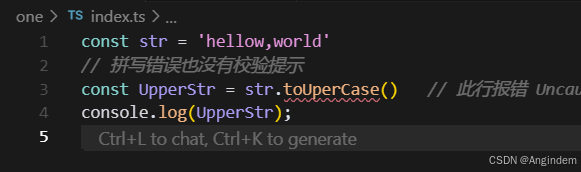
4、低级的拼写错误
1
2
3
4
const str = 'hellow,world' const UpperStr = str.toUperCase () console .log (UpperStr );
3、静态类型检查
ts 是静态类型检查。无需运行就可以给你校验基本错误。
三、编译TypeScript 浏览器不能直接运行 TypeScript 代码,需要编译为 JavaScript 再交由浏览器解析器执行。
1、命令行编译(了解即可) 第一步 :创建 demo.ts 文件。例如:
1
2
3
4
5
const person = {name : 'Angindem' ,age : 32 console .log (`my name is ${person.name} and I'm ${person.age} years old.` );
第二步 :全局安装 TypeScript
第三步 :使用命令编译 .ts 文件
2、自动化编译 第一步 :创建 TypeScript 编译控制文件
工程中会生成一个 tsconfig.json 配置文件,其中包含着很多编译时的配置
观察发现,默认编译的 JS 版本是 ES7 ,我们可以手动调整为其他版本。
第二步 :监视目录中的 .ts 文件变化
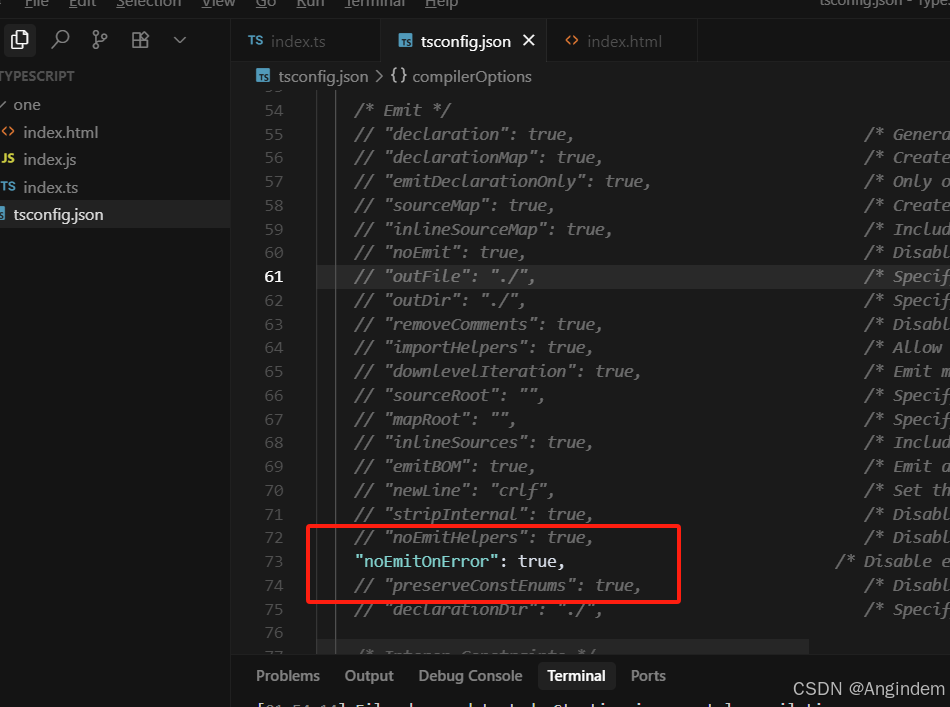
第三步 :加上指定属性进行小优化,当编译出错时不生产 .js 文件
1 tsc --noEmitOnError --watch
(不推荐命令行加上属性优化)
所有的属性开启应该在 tsconfig.json 中进行开启。然后我们执行第二步就行了。
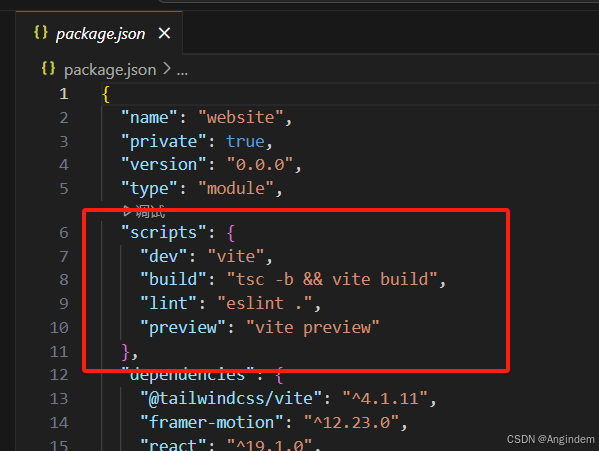
如果使用了脚手架,如 Vue 或React。我们可以发现我们不用以上编译了。而是基于 webpack 或 vite 进行编译运行。随后我们使用 npm 或 yarn 或 pnpm 执行相对应的 script 常量名即可。
四、类型声明(这里可以算是真正开始TypeScript) 使用 “ : 变量 或 函数形参 ,进行 类型声明。
1
2
3
4
5
6
7
8
9
10
11
12
13
14
15
16
17
18
let a : string ;let b : number ;let c : boolean ;'hello world' 123 true function count (x : number , y : number number return x + y
在 “ : 常量值类型 ,不过实际开发中用的不多。
1
2
3
4
5
6
7
8
9
10
11
let a : string ;let b : 'hello' ;'asd' 'hello' console .log (b);
五、类型推断 1 2 3 let d = -99 ; let e = 'hello' ;
六、类型总览 1、JavaScript 中的数据类型 1 2 3 4 5 6 7 8 9 10 ① string number boolean null undefined bigint symbol object object 包含:Array 、Date 、Error 等......
2、TypeScript 中的数据类型 1 2 3 4 5 6 7 8 9 10 11 12 13 1 、上述所有 JavaScript 类型2 、六个新类型any never void enum 3 、两个用户自定义类型的方式type interface
注意点:
在 JavaScript 中的这些内置构造函数:Number、它们用于创建对应String 、Boolean,的包装对象,在日常开发时 很少使用 ,在 Typescript 中也是同理,所以在 Typescript 中进行类型声明时,通常都是用小写的 number、string、boolean
1 2 3 4 5 6 7 8 9 10 11 12 13 let str1 : string 'hello world' let str2 : String 'hello world' new String ('hello world' )
①、 原始类型 VS 包装对象
②. 自动装箱 :JavaScript 在必要时会自动将原始类型包装成对象,以便调用方法或访问属性。
1 2 3 4 5 6 7 8 9 10 11 12 13 let str= 'hello' ;let size = (function (let tempStringObject =new String (str);let lengthValue = tempStringObject.length ;return lengthValue,console .log (size);
七、常用类型 1、any any 的含义是:任意类型,一旦将变量类型限制为 any,那就意味着 放弃了
1 2 3 4 5 6 7 8 9 10 11 12 let a : any; 1 ;"1" ;true ;1 , 2 , 3 ];let b; 1 ;"1" ;true ;1 , 2 , 3 ];
注意点 :any 类型的变量,可以赋值给任意类型的变量。
2、unknow unknown 的含义是: 未知类型。
1 2 3 4 5 6 7 8 9 10 let a : unknown100 false '你好' let x : string
unknown 可以理解为一个类型安全的any,适用于:不确定数据的具体类型
1 2 3 4 5 6 7 8 9 10 11 12 13 14 15 16 17 18 19 20 21 let a : unknown100 false '你好' let x : stringif (typeof a === 'string' ) {as string
读取 any 类型数据的任何属性都不会报错,而 unknown 正好与之相反。
1 2 3 4 5 6 7 8 9 10 11 12 let str1 : string"hello world" toUpperCase () let str2 : any"hello world" toUpperCase () let str3 : unknown"hello world" toUpperCase ()
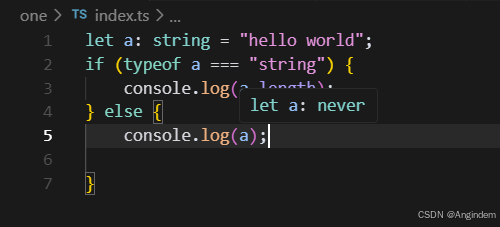
3、never never 的含义是:任何值都不是,简言之就是不能有值,undefined、null、0 都不行!
①、几乎不用never去直接限制变量,因为没有意义,例如:
② never 一般是 TypeScript 主动推断出来的
3、never 也可以用户限制函数的返回值
1 2 3 4 5 6 7 8 9 10 11 12 13 function demo (return 100 ;function demo2 (demo2 ();function demo3 (throw new Error ('error' )
4、void ① void 通常用于函数返回值声明,含义:【函数不返回任何值, 调用者也不应依赖其返回值进行任何操作
1 2 3 4 5 6 function logMessage (msg : string void {console .log (msg);logMessage ("Hello World!" );
注意: 编码者没有编写 return 去指定函数的返回值,所以 1ogMessage 函数是没有 显式返回值 的,但会有一个 隐式返回值 undefined 是void 可以接受的一种“空”。
② 以下写法均符合规范
1 2 3 4 5 6 7 8 9 10 11 12 13 14 function logMessage1 (msg : string void {console .log (msg);function logMessage2 (msg : string void {console .log (msg);return ;function logMessage3 (msg : string void {console .log (msg);return undefined ;
1 2 3 4 5 6 7 8 9 10 11 12 function demo2 (undefined {console .log ("hello world" );let res = demo2 ();if (res) {
理解 void 与 undefined
void 是一个广泛的概念,用来表达“空”,而 undefined 则是这种“空”的具体实现之一。
因此可以说 undefined 是 void 能接受的“空”状态的一种具体形式。
换句话说:void 包含 undefined ,但 void 表达的语义超越了单纯的 undefined ,它是一种意图上的约定,而不仅仅是特定值的限制。
总结 :若函数返回类型为 void ,那么:
从语法上讲:函数是可以返回 undefined 的,至于显示返回,还是隐式返回,这无所谓!
从语义上讲:函数调用者不应关心函数返回的值,也不应依赖返回值进行任何操作!即使返回了 undefined 值。
5、object
关于object 与Object , 直接说结论:实际开发中用的相对较少,因为范围太大了。
object(小写)
object (小写) 的含义是:所有非原始类型 ,可存储:对象、函数、数组等,由于限制的范围比较宽泛 ,在实际开发中使用的相对较少 。
1 2 3 4 5 6 7 8 9 10 11 12 13 14 15 16 17 let a : object name : 'why' }1 , 3 , 5 , 7 , 9 ]function (new String ('why' )class Person { }new Person ()1 true 'why' null undefined
Object (大写)
官方描述 :所有可以调用 Object方法 简单记忆 :除了 undefined 和 null 的任何值。太大了 频率极低
1 2 3 4 5 6 7 8 9 10 11 12 13 14 15 16 let b : Object class Person { }new Person ()name : 'why' }1 , 3 , 5 , 7 , 9 ]function (new String ('why' )1 true 'why' null undefined
声明对象类型 ①、实际开发总,限制一般对象,通常使用以下形式
1 2 3 4 5 6 7 8 9 10 11 12 13 14 15 16 17 18 19 let person1 : { name : string , age ?: number };let person2 : { name : string ; age ?: number };let person3 : {name : string age ?: number name : 'Tom' };name : 'Tom' , age : 18 };age : 18 , name : 'Tom' };name : 'Tom' , age : 18 , gender : 'male' };
②、 索引签名 : 允许定义对象可以具有 任意数量的属性 键 类型 可变的
1 2 3 4 5 6 7 8 9 let person3 : {name : string age ?: number key : string ]: any age : 18 , name : 'Tom' };name : 'Tom' , age : 18 , gender : 'male' };
声明函数类型 1 2 3 4 5 6 7 8 9 10 11 12 13 14 15 16 let count : (asdasdads : number , dasafsfasb : number number ; (x, y ) => {return x + y
备注:
TypeScript 中的 =>在函数类型声明时表示 函数类型 ,描述其 参数类型 和 返回类型
JavaScript 中的 =>是一种定义函数的语法,是具体的的数实现。
函数类型声明还可以使用:接口、自定义类型等方式,下文中会详细讲解。
声明数组类型 1 2 3 4 5 6 let arr : string [];let arr2 : Array <number >;1 ,2 ,123 ];
备注: 上述代码中的 Array属于泛型,下文会详细讲解。
6、tuple 元组(Tuple)是一种特殊的 数组类型 ,可以存储 固定数量 的元素,并且每个元素的类型是 已知的 且 可以不同 ,元组用于精确描述一组值的类型,?表示可选的元素。
1 2 3 4 5 6 7 8 9 10 11 12 13 let arr3 : [boolean , number , ...string []] = [true , 1 , 'asddsadas' , 'asdadsasdads' ];
7、enum 枚举(enum) 可以定义 一组命名常量 ,它能增强代码的 可读性 ,也让代码 更好维护 。
如下代码的功能是:根据调用 walk 时传入的不同参数,执行不同的逻辑,存在的问题是调用 walk 时传参时没有任何提示,编码者很容易写错字符串内容;并且用于判断逻辑的up、down、left、right 是 连续且相关的一组值 枚举(enum )
1 2 3 4 5 6 7 8 9 10 11 12 13 14 15 16 17 const walk = (str : string ): void =>if (str === 'up' ){console .log ('向【上】走' );else if (str === 'down' ){console .log ('向【下】走' );else if (str === 'left' ){console .log ('向【左】走' );else if (str === 'right' ){console .log ('向【右】走' );else {console .log ('未知方向' );walk ('up' );walk ('down' );walk ('left' );walk ('right' );
数字枚举 数字枚举一种最常见的枚举类型,其成员的值会 自动递增 反向映射 值 成员名称。
1 2 3 4 5 6 7 8 9 10 11 12 13 14 15 16 17 18 19 20 21 22 23 24 enum Direction {Up = 5 ,Down = 12 ,Left , Right function walk (str : Direction console .log (str);if (str === Direction .Up ) {console .log ("向【上】走" );else if (str === Direction .Down ) {console .log ("向【下】走" );else if (str === Direction .Left ) {console .log ("向【左】走" );else if (str === Direction .Right ) {console .log ("向【右】走" );else {console .log ("无效的参数" );walk (Direction .Left );
字符串枚举 枚举成员的值是字符串。 注意:这里就没有反向映射
1 2 3 4 5 6 7 8 9 10 11 12 13 14 15 16 17 18 19 20 21 enum Direction {Up = 'up' ,Down = 'down' ,Left = 'left' ,Right = 'right' function walk (str : Direction console .log (str);if (str === Direction .Up ) {console .log ("向【上】走" );else if (str === Direction .Down ) {console .log ("向【下】走" );else if (str === Direction .Left ) {console .log ("向【左】走" );else if (str === Direction .Right ) {console .log ("向【右】走" );else {console .log ("无效的参数" );
常量枚举
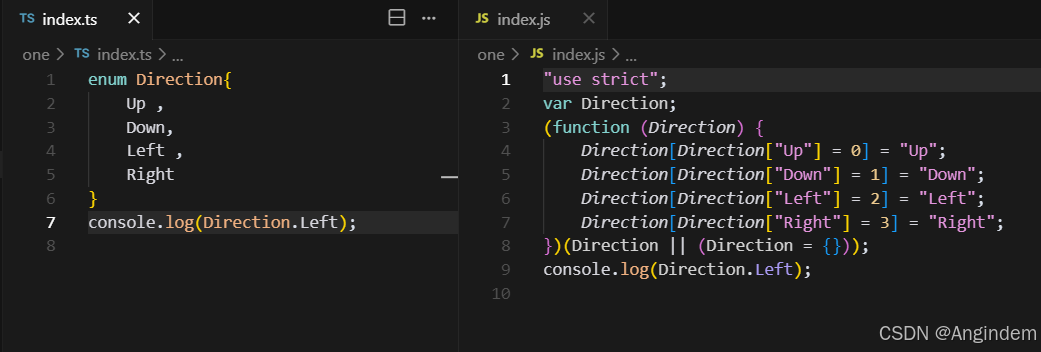
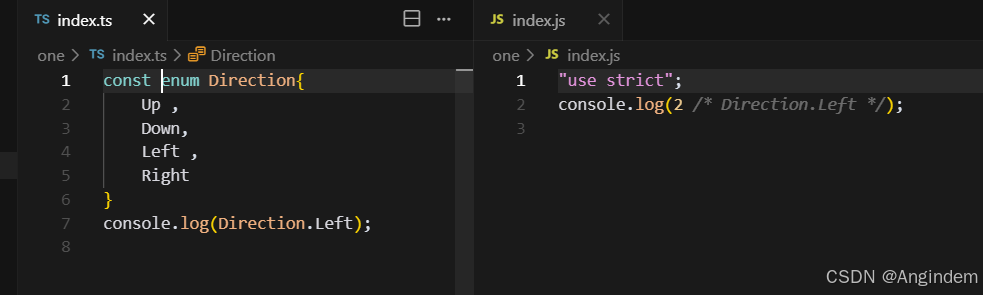
官方描述:常量枚举是一种特殊枚举类型,它 使用 const 关键字定义 内联,避免
何为编译时内联 ? 成员引用 替换为它们的 实际值 ,而不是生成额外的枚举对象。这可以减少生成的 JavaScript 代码量,并提高运行时性能。
使用普通枚举的TypeScript效果如下:
常量枚举后,效果如下:
8、type type 可以为任意类型创建别名,让代码更简洁、可读性更强,同时能更方便地进行类型复用和扩展。
基本用法:
类型别名使用 type 关键字定义,type 后跟类型名称,例如下面代码中 Num 是类型别名。
1 2 3 4 5 type Num = number ;function printNum (num : Num void { console .log (num);printNum (200 );
联合类型:
联合类型是一种高级类型,它表示一个值可以是几种不同类型之一。 (简单理解:或 概念)
1 2 3 4 5 6 7 8 9 10 11 12 13 14 15 type Status = number | string ;type gender = 'male' | 'female' ;function printStatus (status : Status void { console .log (status);function printGender (gender : gendervoid { console .log (gender);printStatus (200 );printStatus ('string' );printGender ('male' );printGender ('female' );
交叉类型
交叉类型(Intersection Types):允许将多个类型合并为一个类型。合并后的类型将拥有所有被合并类型的成员。交又类型通常用于对象类型。 (简单理解:“ 并且and ” 概念)
1 2 3 4 5 6 7 8 9 10 11 12 13 14 15 16 17 18 19 20 21 22 23 24 type Area = {hight : number ,width : number type Address = {num : number cell : number room : string type House = Address & Area const house : House = {hight : 10 ,width : 20 ,num : 3 ,cell : 4 ,room : 'B-324' type Demo = number & string let x : Demo ;
9、特殊情况 情况1: 在函数定义时,限制函数返回值为 void ,那么函数的返回值就必须是空 或 undefined
1 2 3 4 5 6 7 8 9 10 11 function demo (void {return ;return undefined ;
情况2(特殊):
使用 类型声明 限制函数返回值为 void 时, Typescript 并不会严格要求函数返回空。
1 2 3 4 5 6 7 8 9 type LogFunc = () => void ; const f1 : LogFunc = function (return 999
为什么会这样?
是为了确保如下代码成立,我们知道Array.prototype.push的返回一个数字,而Array.prototype.forEach 方法期望其回调的返回类型是 void
1 2 3 4 5 6 7 8 9 const src = [1 , 2 , 3 ]const dst = [0 ]forEach ((el ) => dst.push (el))map ((item ) => { return item + 1 })find ((item ) => { return item > 1 })
官方解释文档: TypeScript: Documentation - More on Functions
10、复习类相关知识 本小节是复习类相关知识,如果有相关基础可以跳过。这里的类知识跟 Java 的类知识基本一致。
class类 1 2 3 4 5 6 7 8 9 10 11 12 13 14 15 16 17 class Person {private name : string constructor (name : string this .name = namepublic speak (console .log (`Hi, I am ${this .name} ` )public getName (return this .name const p1 = new Person ('Angindem' )speak ();
继承类 1 2 3 4 5 6 7 8 9 10 11 12 13 14 15 16 17 18 19 20 21 22 23 24 25 26 27 28 29 30 31 32 33 34 35 36 37 38 39 40 41 class Person {private name : string constructor (name : string this .name = namepublic speak (console .log (`Hi, I am ${this .name} ` )public getName (return this .name class Student extends Person {private age : number constructor (name : string , age : number super (name);this .age = agepublic study (console .log (`I am studying` )override speak (console .log (`I am ${this .getName()} and I am ${this .age} years old` )const s1 = new Student ('Angindem' , 18 )study ()speak ()
11、属性修饰符
修饰符
含义
具体规则
public
公开的
可以被: 类内部、子类、类外部 访问。
protected
受保护的
可以被: 类内部、子类 访问。
private
私有的
可以被: 类内部 访问。
readonly
只读属性
属性无法修改
注意点:Script中 class 类内部没有指定属性修饰符的时候默认是 public
简写构造器
1 2 3 4 5 6 class Person {constructor (public name :string ,public age :number const p1 = new Person ('张三' , 18 );console .log (p1.name );
12、抽象类
概述:抽象类是 无法被实例化 结构和行为 抽象方法 具体实现 。抽象类主要用来为其派生类提供一个 基础结构 ,要求其派生类 必须实现 不能实例化 ,其意义是 可以被继承 普通方法 抽象方法 。
通过以下场景,理解抽象类:
我们定义一个抽象类 Package ,表示所有包裏的基本结构,任何包裏都有重量属性 weight ,包裏都需要计算运费。但不同类型的包裹(如:标准速度、特快专递)都有不同的运费计算方式,因此用于计算运费的 calculate 方法是一个抽象方法,必须由具体的子类来实现。
1 2 3 4 5 6 7 8 9 10 11 12 13 14 15 16 17 18 19 20 21 22 23 24 25 26 27 28 29 30 31 abstract class Package {constructor (public weight :number abstract calculateCost (): number printPackageInfo (console .log (`包裹的重量为 ${this .weight} kg,运费为 ${this .calculateCost()} 元` );class StandardPackage extends Package {constructor ( weight : number , public unitPrice : number ) {super (weight);calculateCost (): number {return this .weight * 0.5 * this .unitPrice ;const s1 = new StandardPackage (5 , 4 );printPackageInfo ();
总结:何时使用 抽象类 定义通用接口 :为一组相关的类定义通用的行为(方法或属性)时。提供基础实现 :在抽象类中提供某些方法或为其提供基础实现,这样派生类就可以继承这些实现。确保关键实现 :强制派生类实现一些关键行为。共享 代码和逻辑
13、接口 interface 是一种 定义结构 一种契约 ,这样可以确保代码的一致性和类型安全,但要注意 interface 只能 定义 格式 任何实现 !
定义 类 结构 1 2 3 4 5 6 7 8 9 10 11 12 13 14 15 16 interface PersonInterface {name : string ;speak (n :number ): void ;class Person implements PersonInterface {constructor (public name :string speak (n : number ): void {for (let i = 0 ; i < n; i++){console .log (`${this .name} says hello!` );const p = new Person ('Angindem' );speak (5 );
定义 对象 1 2 3 4 5 6 7 8 interface CountInterface {a : number , b : number ): number ;const count : CountInterface = (a : number , b : number ): number =>return a + b;
定义 函数 结构 1 2 3 4 5 6 7 8 interface CountInterface {a : number , b : number ): number ;const count : CountInterface = (a : number , b : number ): number =>return a + b;
接口之间的继承 interface继承另一个interface,从而实现代码的复用
1 2 3 4 5 6 7 8 9 10 interface PersonInterface {name : string ;age : number ;interface StudentInterface extends PersonInterface {grade : string ;const stu :StudentInterface = {name : '张三' , age : 18 , grade : 'A' };
接口自动合并(可重复定义) 1 2 3 4 5 6 7 8 9 10 11 12 13 14 interface PersonInterface {name : string ;age : number ;interface PersonInterface {gender : string ;const p : PersonInterface = {name : '张三' ,age : 18 ,gender : '男'
总结:何时使用接口?
14、一些相似概念的区别 14.1 interface 与 type 区别
相同点 :interface 和 type都可以用于定义 对象结构 不同点:
interface:更专注于定义 对象 类 的结构,支持 继承、合并
type:可以定义 类型别名、联合类型、交叉类型
14.2 interface 与 抽象类的区别
相同点 :都用于定义一个 类的格式 (应该遵循的契约)不相同 :
接口: 只能 结构 不能 有任何 实现代码 ,一个类可以实现多个接口。
抽象类:既可以包含 抽象方法 ,也可以包含 具体方法 ,一个类只能继承一个抽象类。
八、泛型 泛型允许我们在定义函数、类或接口时,使用类型参数来表未 指定的类型 使用时 才被指定 具体的类型 ,泛型能让同一段代码适用于多种类型,同时仍然保持类型的安全性。
举例:如下代码中就是泛型,(不一定非叫 T),设置泛型后即可在函数中使用 T来表示该类型:
泛型函数
1 2 3 4 5 6 7 8 function logData<T>(data : T): T{console .log (data);return datastring >('hello world' );number >(123 );
泛型可以有多个
1 2 3 4 5 6 7 function logData<T, U>(data1 : T, data2 : U): T | U {Date .now () % 2 ? console .log (data1) : console .log (data2);return Date .now () % 2 ? data1 : data2;string ,boolean >('hello world' ,true );number ,boolean >(123 ,true );
泛型接口
1 2 3 4 5 6 7 8 9 10 11 12 13 14 15 16 17 18 19 interface PersonInterface <T>{name : string ;age : number ;extraInfo : T;type Job = {jobTitle : string ;salary : number ;let p : PersonInterface <Job > = {name : 'Jane' ,age : 25 ,extraInfo : {jobTitle : 'Software Developer' ,salary : 50000
泛型类
1 2 3 4 5 6 7 8 9 10 11 12 13 14 15 16 17 18 19 class Person <T>{constructor ( public name : string , public age : number , public extraInfo : T ) { }speak (console .log (`${this .name} is ${this .age} years old` )console .log (this .extraInfo );type Job = { job : string };const p1 = new Person <string >('Mike' , 20 , 'I am a string' );speak ();const p2 = new Person <Job >('Mike' , 20 , { job : 'Software Engineer' });speak ();
九、类型声明文件(.d.ts) 类型声明文件是 TypeScript 中的一种特殊文件,通常以.d.ts 作为扩展名。它的主要作用是为现有的 JavaScript 代码提供类型信息,使得 TypeScript 能够在使用这些 JavaScript 库或模块时进行类型检查和提示。
一般项目中都会在 types 文件夹中。
假设有demo.js
1 2 3 4 5 6 export function add (a, b ) {return a + b;export function mul (a, b ) {return a * b;
然后我们 ts 引入
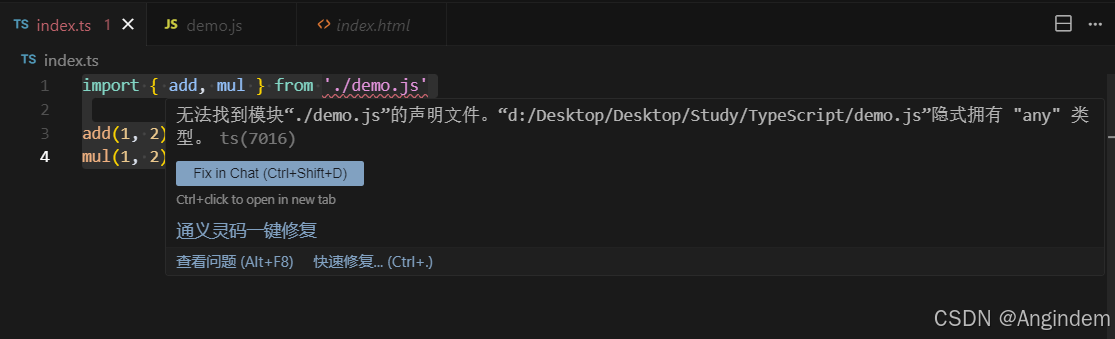
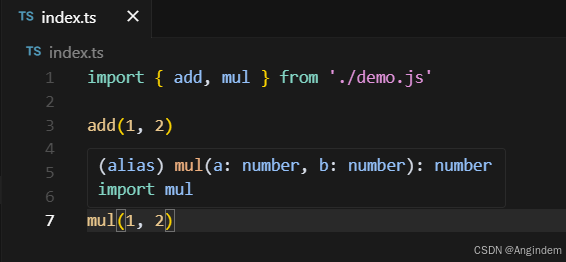
原因:引入的 JS 默认为 any ,爆出警告,所以我们需要类型声明文件
1 2 3 4 5 6 7 8 9 10 declare function add (a : number , b : number number ;declare function mul (a : number , b : number number ;export {