websoket 学习笔记
原创 已于 2025-04-14 22:59:16 修改 · 粉丝可见 · 1.1k 阅读 · 9 · 9 GEO检测 · 编辑
文章链接:https://blog.csdn.net/hacker_51/article/details/147137646
目录
[TOC]
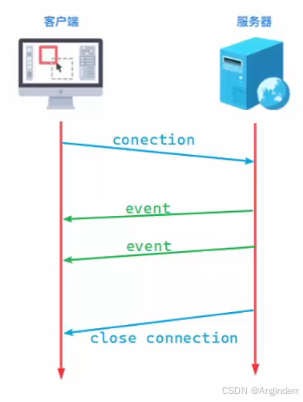
WebSocket是一种基于 TCP 的网络通信协议,允许在客户端和服务器之间建立持久的双向通信连接。
基本概念
全双工通信(Full Duplex) :WebSocket 支持客户端和服务器在同一连接上同时发送和接收数据,允许数据在两个方向上同时传输。
半双工(Half Duplex) :允许数据在两个方向上传输,但是同一个时间段内只允许一个方向上传输。
持久连接 :通过一次握手建立连接后,连接会一直保持,无需每次通信都重新建立
低延迟与高效性 :减少了传统 HTTP 请求-响应模式中的频繁连接开销,数据传输更高效
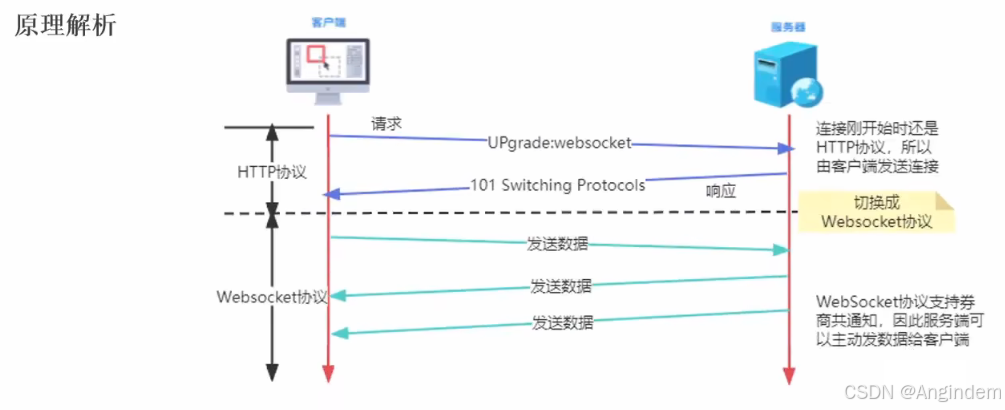
工作原理
- 握手阶段 :客户端通过 HTTP 请求向服务器发起 WebSocket 升级请求,服务器响应后将连接升级为 WebSocket
优势
应用场景
WebSocket 是现代 Web 开发中实现高效实时通信的重要技术,广泛应用于各种需要快速数据交互的场景。
HTTP协议与 webSoket协议之间的对比
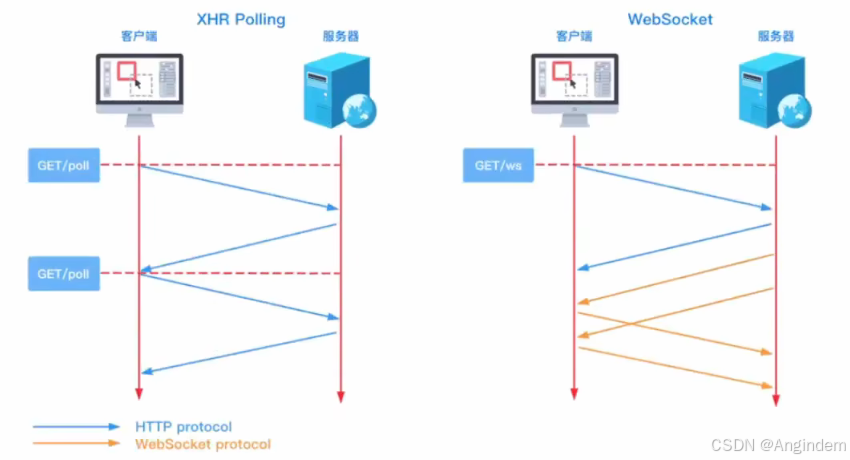
用到最多的其中一个场景就是 消息推送。
消息推送场景
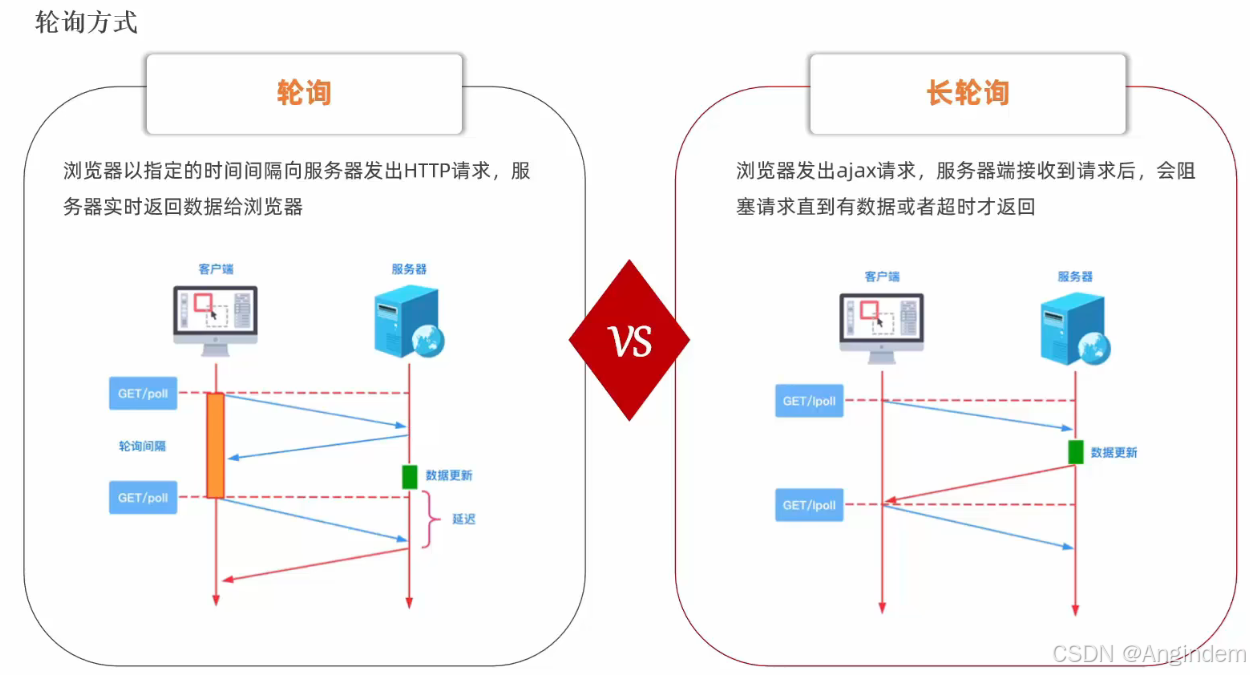
消息推送是指服务器主动向客户端发送信息的技术。以下是几种常见的消息推送方式:
1. 轮询(Polling)
2. 长轮询(Long Polling)
3. 服务器发送事件(Server-Sent Events, SSE)
原理 :
优点 :
缺点 :
不支持双向通信。
不支持跨域,需要服务器和客户端在同一个域下。
适用场景 :股票行情、新闻推送等单向通知场景。
4. WebSocket
不同消息推送方式各有优缺点,选择时需要根据具体需求和场景进行权衡。例如:
服务端WebSoket
基本介绍
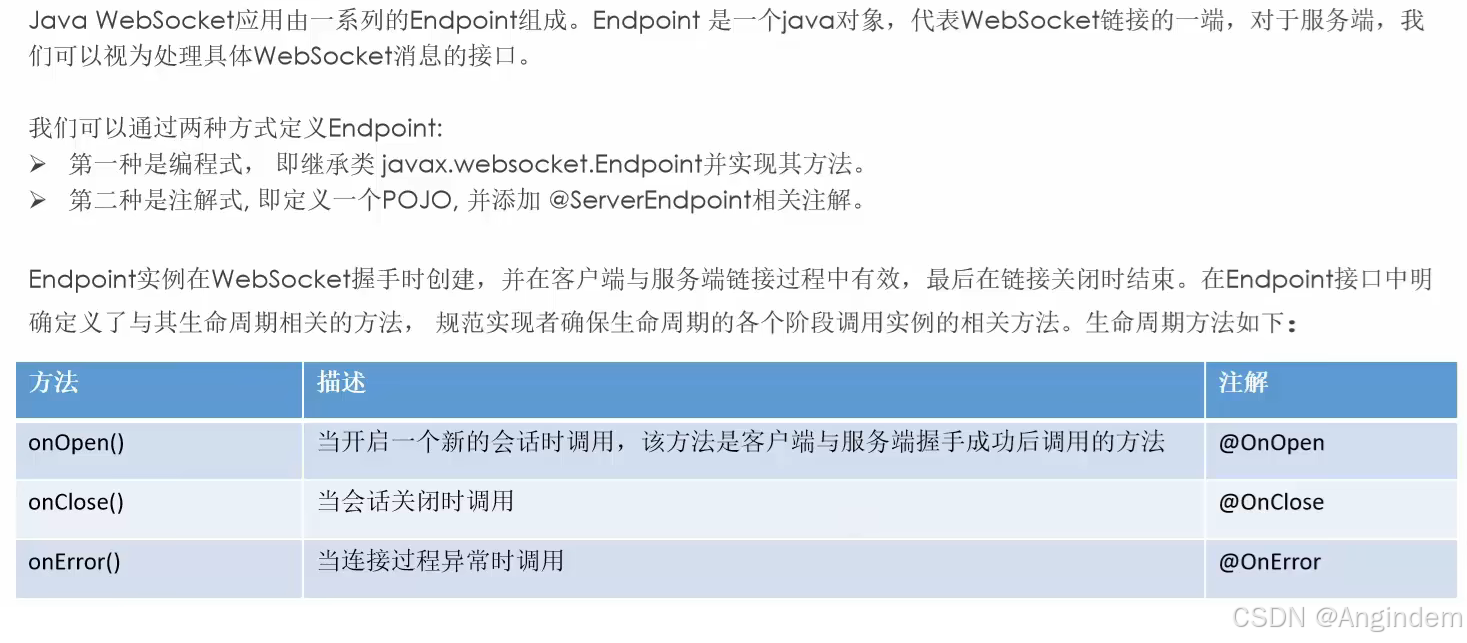
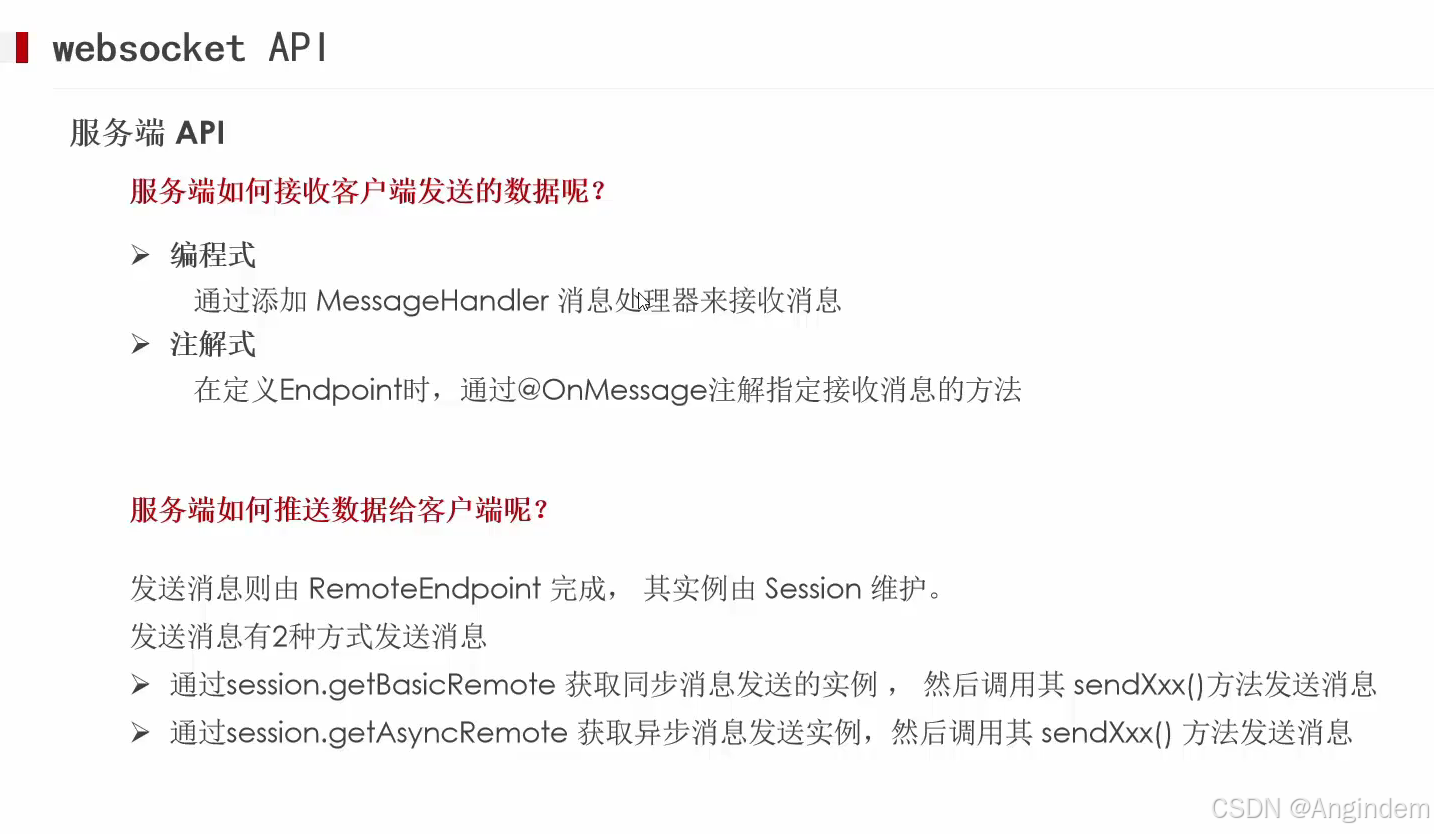
引入依赖
1
2
3
4
| <dependency>
<groupId>org.springframework.boot</groupId>
<artifactId>spring-boot-starter-websocket</artifactId>
</dependency>
|
核心API示例
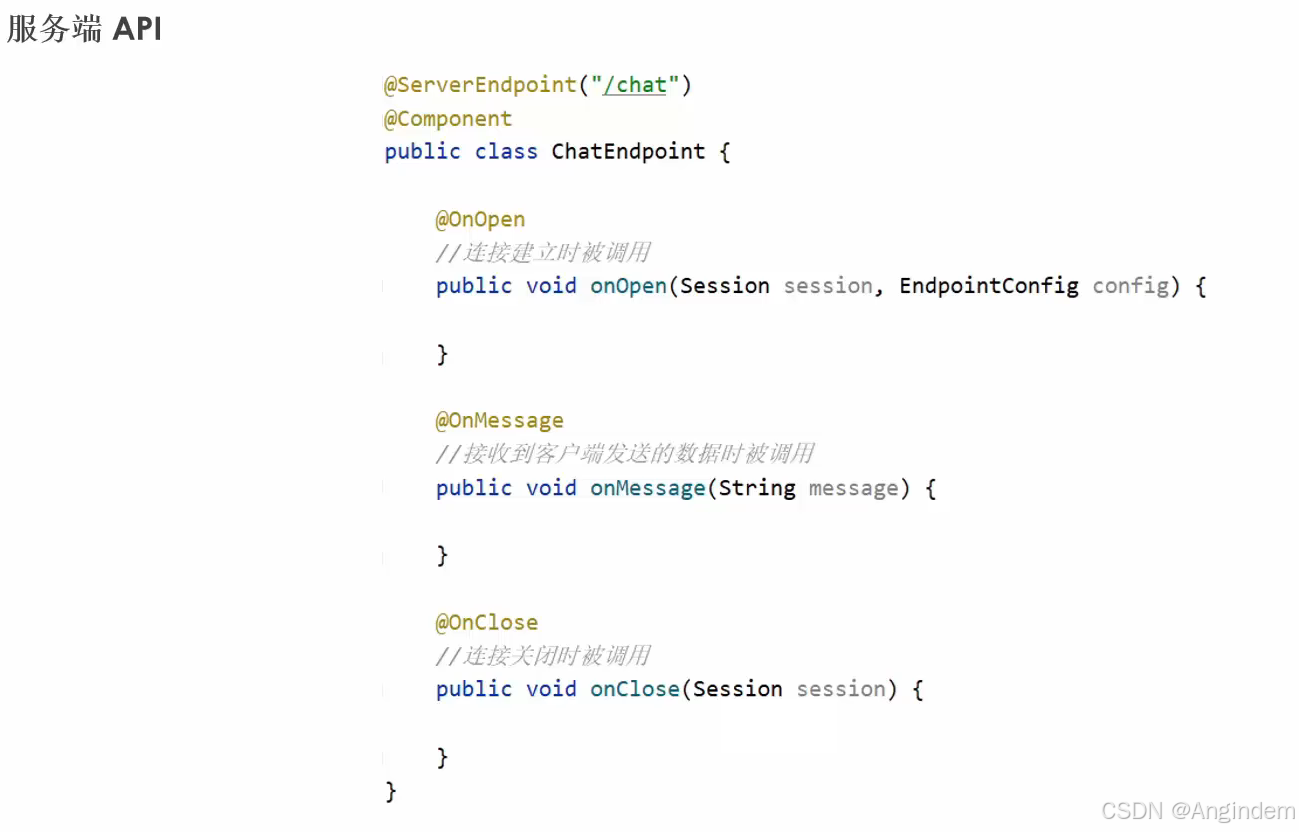
聊天消息demo流程分析
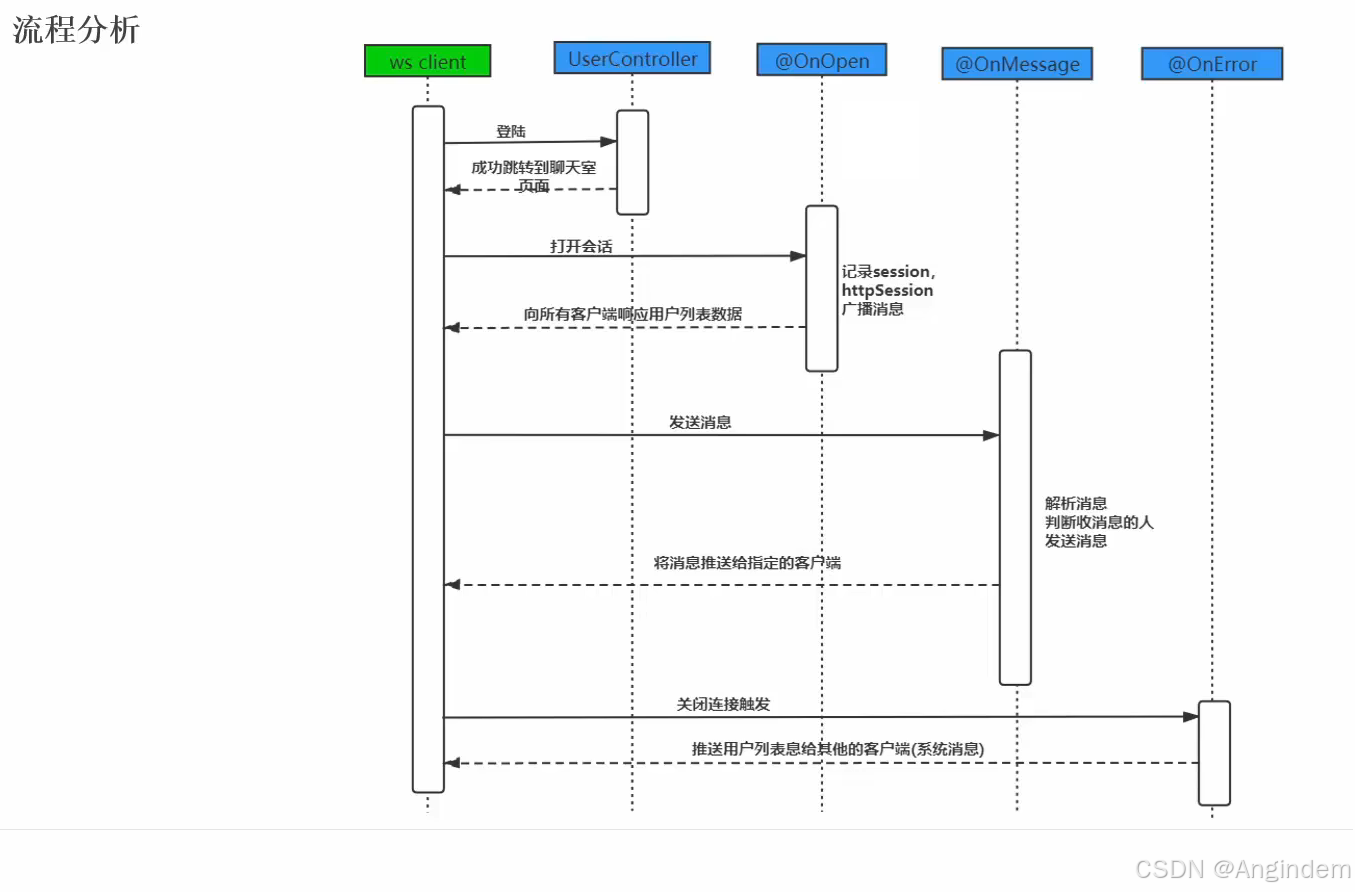
配置类
webSocketConfig(注入ServerEndpoint注解)
1
2
3
4
5
6
7
8
9
10
11
12
| package com.angindem.server.config;
import org.springframework.context.annotation.Bean;
import org.springframework.context.annotation.Configuration;
import org.springframework.web.socket.server.standard.ServerEndpointExporter;
@Configuration
public class WebSocketConfig {
@Bean
public ServerEndpointExporter serverEndpointExporter() {
return new ServerEndpointExporter();
}
}
|
GetHttpSessionConfig(存储Session会话对象)
1
2
3
4
5
6
7
8
9
10
11
12
13
14
15
16
17
18
19
20
21
22
23
24
25
26
27
28
29
30
31
32
33
| package com.angindem.server.config;
import com.angindem.common.utils.CommonUtils;
import com.angindem.common.utils.IpUtils;
import jakarta.servlet.http.HttpServletRequest;
import jakarta.servlet.http.HttpSession;
import jakarta.websocket.HandshakeResponse;
import jakarta.websocket.server.HandshakeRequest;
import jakarta.websocket.server.ServerEndpointConfig;
import org.springframework.web.context.request.RequestContextHolder;
import org.springframework.web.context.request.ServletRequestAttributes;
public class GetHttpSessionConfig extends ServerEndpointConfig.Configurator {
@Override
public void modifyHandshake(ServerEndpointConfig sec, HandshakeRequest request, HandshakeResponse response) {
HttpSession httpSession = (HttpSession) request.getHttpSession();
ServletRequestAttributes attributes = (ServletRequestAttributes) RequestContextHolder.getRequestAttributes();
HttpServletRequest req = attributes.getRequest();
if (httpSession == null) httpSession = req.getSession();
String ip = IpUtils.getIpAddress(req);
httpSession.setAttribute("user", CommonUtils.getRandomString(8));
sec.getUserProperties().put(HttpSession.class.getName(), httpSession);
sec.getUserProperties().put(String.class.getName(), ip);
}
}
|
服务类
Server端Socket
1
2
3
4
5
6
7
8
9
10
11
12
13
14
15
16
17
18
19
20
21
22
23
24
25
26
27
28
29
30
31
32
33
34
35
36
37
38
39
40
41
42
43
44
45
46
47
48
49
50
51
52
53
54
55
56
57
58
59
60
61
62
63
| package com.angindem.server.wx;
import com.alibaba.fastjson2.JSON;
import com.angindem.common.utils.MessageUtils;
import com.angindem.server.config.GetHttpSessionConfig;
import com.angindem.server.wx.pojo.Message;
import jakarta.servlet.http.HttpSession;
import jakarta.websocket.*;
import jakarta.websocket.server.ServerEndpoint;
import lombok.extern.slf4j.Slf4j;
import org.springframework.stereotype.Component;
import java.util.Map;
import java.util.concurrent.ConcurrentHashMap;
@Slf4j
@Component
@ServerEndpoint(value = "/chat", configurator = GetHttpSessionConfig.class)
public class ChatEndPoint {
public static final Map<String, Session> onlineUsers = new ConcurrentHashMap<>();
private HttpSession httpSession;
@OnOpen
public void onOpen(Session session, EndpointConfig config) {
log.info("连接建立成功");
this.httpSession = (HttpSession) config.getUserProperties().get(HttpSession.class.getName());
String reqIp = (String) config.getUserProperties().get(String.class.getName());
String user = MessageUtils.getNowSessionUserName(this.httpSession);
onlineUsers.put(user, session);
log.info("当前在线人数:{}", onlineUsers.size());
log.info("当前用户:{},来自:{}", user, reqIp);
String message = MessageUtils.getDataMessage("system", user, MessageUtils.getFrinds());
MessageUtils.broadcastAllUsers(message);
}
@OnMessage
public void onMessage(String message) {
log.info("收到消息:{}", message);
Message msg = JSON.parseObject(message, Message.class);
String toName = msg.getToName();
String mess = msg.getMessage();
String user = MessageUtils.getNowSessionUserName(this.httpSession);
String sendMessage = MessageUtils.getMessage("user", user, mess);
MessageUtils.broadcastAllUsers(sendMessage);
}
@OnClose
public void onClose(Session session) {
log.info("连接关闭");
String user = MessageUtils.getNowSessionUserName(this.httpSession);
onlineUsers.remove(user);
log.info("当前在线人数:{}", onlineUsers.size());
String message = MessageUtils.getDataMessage("system", user, MessageUtils.getFrinds());
MessageUtils.broadcastAllUsers(message);
}
}
|
客户端
(VueUse的 webSocket 客户端)
1
2
3
4
5
6
7
8
9
10
11
12
13
14
15
16
17
18
19
20
21
22
23
24
25
26
27
28
29
30
31
32
|
const { status, data, close, open, send } = useWebSocket(`ws://localhost:9898/chat`, {
onConnected: function (ws) {
console.log('websocket 连接成功!', ws)
},
onDisconnected: function (ws, event) {
console.log('onDisconnected')
},
onError: function (ws, event) {
console.log('onError', event)
},
onMessage: function (ws, event) {
console.log('event.data', event.data)
if (event.data) {
const info = JSON.parse(event.data)
console.log(info)
if (info.data) updateUsers(info.data);
if (info.message) messageInfo.value.push(info)
}
},
heartbeat: false,
autoClose: false,
});
|
扩展:
同时可以通过 vue 中的 watch 监听发送过来的数据
1
2
3
4
5
6
7
|
import { watch } from 'vue';
watch(data, () => {
console.log(data.value)
})
|
发送消息到服务端
1
2
3
4
5
|
const info = "你好吗?"
send(info)
|